Claude Cowork vs Claude Code: A Decision Framework for Business Teams
Digital TransformationPublished on by Alex Korniienko • 6 min. read
- The Permission Model Is the Whole Story
- Claude Cowork: What It's Actually For
- The Workflows Where Cowork Earns Its Place
- What Cowork Doesn't Do
- Claude Code: What It's Actually For
- The Workflows Where Claude Code Earns Its Place
- What Claude Code Doesn't Do Well
- The Decision Framework: Workflow to Tool
- MCP Integration: Shared Architecture, Different Risk Profile
- What This Means for Your Engineering Team
- FAQ
- Conclusion
Anthropic built two agentic tools that both take real actions. Which workflows belong to each one is the question most comparisons skip.
Most evaluations of Claude Cowork vs Claude Code frame the question as a product comparison: which one does more, which one integrates better, which one your team should adopt. That framing misses the point. These are not competing tools. They're complementary ones - designed for different parts of a business, different permission environments, and different categories of work. Deploying either one without understanding where it belongs creates problems that a feature comparison won't surface.
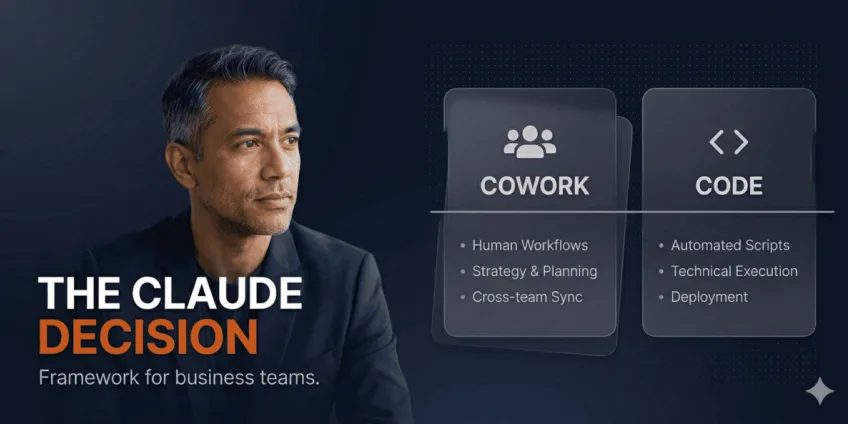
Claude Cowork and Claude Code are both agentic AI tools from Anthropic that execute multi-step tasks without constant supervision, but they operate in fundamentally different environments. Claude Cowork runs inside a sandboxed desktop application with restricted filesystem access, built for non-technical teams automating document-heavy and cross-tool workflows. Claude Code runs in a developer's terminal with full system permissions, built for engineering workflows: code generation, testing, refactoring, and deployment pipelines. The decision isn't about capability - it's about which workflows in your organization belong to which execution environment.
Both tools connect to external services through the Model Context Protocol (MCP), an open standard Anthropic released in late 2024 that allows AI agents to pull live context from tools like Google Drive, Slack, Jira, and GitHub before acting. Neither is working from static knowledge. That shared architecture is where the similarity ends.
The Permission Model Is the Whole Story
Every meaningful difference between these two tools follows from one fact: where each one runs and what it can touch.
Claude Cowork runs inside a sandboxed virtual machine. Its access is limited to folders and applications you've explicitly approved. If a task goes wrong - a misunderstood instruction, an unexpected file operation, a bad output - the blast radius is contained. Your broader filesystem is untouched. Non-technical team members can use it without needing to understand system-level risk.
Claude Code runs directly in the terminal with the full permissions of whoever launched it. That means complete filesystem access, shell command execution, Git control, and the ability to run arbitrary scripts. It operates at the same privilege level as the developer who opened it. A misunderstood instruction here doesn't stay contained - it executes with the same authority as a deliberate command.
That gap determines who should operate each tool, what task categories belong to each, and what the failure modes look like when either is used outside its intended scope. Everything else in a Claude Cowork vs Claude Code evaluation is downstream of this distinction.
Claude Cowork: What It's Actually For
Cowork is designed for the category of work that consumes a disproportionate share of knowledge workers' time without requiring a disproportionate share of their judgment: document organization, report compilation, spreadsheet construction, presentation building, and cross-tool research synthesis.
The interface is a desktop application. A team member describes a task. The agent executes it within its sandboxed environment. The output is reviewed and used. No script, no terminal, no IT dependency.
The Workflows Where Cowork Earns Its Place
Document processing and reorganization. Cowork reads file contents rather than just filenames. Given a folder of contracts, receipts, or research PDFs, it can identify duplicates, propose a logical naming and filing structure based on what's inside each document, and execute the reorganization. This is hours of manual work compressed into a supervised task.
Spreadsheet and presentation creation. The output is working files - not a description of what a file should contain. An Excel report comes back with formulas, structured data, and usable formatting. A PowerPoint presentation arrives as structured slides built from source materials, with citations where the content calls for them. This distinction matters: Cowork produces deliverables, not drafts that require a second round of construction.
Cross-tool research synthesis. Via MCP integrations, Cowork can pull live context from Slack threads, Google Drive documents, and other connected sources before it composes an output. When synthesizing a competitive brief or compiling a project status report, it reads the actual documents in your environment rather than approximating from general knowledge.
Worth saying: the quality ceiling on any of this is the quality of the data it's working from. A Cowork agent synthesizing research from an outdated or disorganized knowledge base produces an output that reflects those flaws. The tool amplifies whatever structure - or lack of it - exists in the underlying information environment.
What Cowork Doesn't Do
Cowork does not write, test, or deploy code. It does not interact with development environments, package managers, or version control systems in an engineering context. Asking it to perform engineering work is not just inefficient - it's structurally outside what the sandboxed environment allows. For technical work, the right environment is the other tool.
Claude Code: What It's Actually For
Claude Code is a command-line tool built for developers. It operates as an agentic coding assistant with full access to the development environment: the filesystem, the shell, the Git history, the test runner, the deployment scripts. It can read an entire codebase, make targeted changes across multiple files simultaneously, run tests, interpret the results, and iterate - all from a single instruction.
The product shipped as generally available in early 2026 and has moved quickly into production engineering workflows. Its core proposition is that the most expensive part of a developer's day - context-switching between understanding, writing, testing, and debugging - can be substantially compressed when an agent with full codebase access handles the mechanical parts of that loop.
The Workflows Where Claude Code Earns Its Place
Codebase-wide changes. A refactoring task that requires touching fifty files - renaming a function, updating an interface, migrating a deprecated pattern - is work that takes a developer hours of careful, error-prone manual effort. Claude Code executes it in minutes, with the ability to run the test suite afterward and catch what broke.
Test generation and coverage. Writing tests is necessary, time-consuming, and often deferred under sprint pressure. Claude Code generates test cases from existing implementation logic, including edge cases that manual test writing tends to miss. A developer reviews and adjusts; they don't start from blank.
Legacy code understanding. Reading unfamiliar or undocumented code well enough to make safe changes is one of the highest-friction tasks in engineering. Claude Code's large context window allows it to hold a substantial portion of a codebase in view simultaneously, explain what a system does, map dependencies, and surface risk areas before a change is made.
Deployment and infrastructure scripting. Shell scripts, CI/CD configuration, Dockerfile construction - Claude Code handles these with the same filesystem access as the developer, generating and testing infrastructure code directly in the environment where it will run.
What Claude Code Doesn't Do Well
The same research that showed AI tools cutting development time on routine tasks also found experienced developers working on genuinely novel problems completing them 19% slower with AI assistance than without it (METR, 2025). Claude Code is not an exception. On architectural decisions, subtle production debugging, and security-critical logic that requires adversarial reasoning, the tool introduces verification overhead that outweighs its generation benefit. Senior engineers on hard problems should use it selectively, not reflexively.
The full-terminal permission model also means that careless or incorrectly scoped instructions carry real risk. In an engineering team context, this is managed through code review and developer judgment - the same safeguards that govern any code changes. In a non-developer's hands, those safeguards don't exist. Claude Code is not a tool for business operations teams.
The Decision Framework: Workflow to Tool
The clearest way to allocate work between these two tools is by task profile, not by user seniority or department.
| Workflow type | Appropriate tool | Reason |
| Document organization and filing | Cowork | Sandboxed; no code execution required. |
| Spreadsheet and report generation | Cowork | File creation within a safe environment. |
| Cross-tool research synthesis | Cowork | MCP pulls from business tools; output is text or a document. |
| Presentation building from source materials | Cowork | Deliverable creation; no system access needed. |
| Codebase refactoring across multiple files | Claude Code | Requires filesystem write access and test execution. |
| Test generation and coverage | Claude Code | Requires running the test suite in a live environment. |
| CI/CD and infrastructure scripting | Claude Code | Requires shell execution and environment access. |
| Legacy code comprehension | Claude Code | Large context window over the actual codebase. |
| Onboarding documentation from live codebase | Either | Cowork if output is a document; Claude Code if output feeds into the repo. |
| Security-critical logic | Neither as primary | Human judgment required; AI as an assistant only. |
The overlap row - onboarding documentation - is illustrative. The tool that belongs depends on where the output lands. If a new engineer needs a readable guide to the codebase, Cowork can synthesize that from connected Drive and Slack sources without touching the repository. If the documentation needs to live inside the repo, properly formatted and committed, Claude Code handles the file writing and Git operations. The task type is the same; the output destination determines the tool.
MCP Integration: Shared Architecture, Different Risk Profile
Both tools connect to external services through MCP. The integration layer is the same. The risk profile is not.
A Cowork MCP integration that pulls from Google Drive or Slack is operating with read access to business documents and communication. A misconfiguration or overly broad permission grant exposes business data to a sandboxed agent - recoverable from an operational standpoint, though still a data governance concern.
A Claude Code MCP integration that connects to a GitHub repository or a deployment pipeline is granting an agent with shell access the ability to interact with production systems. The risk surface is categorically different. MCP integrations for Claude Code should be scoped with the same discipline as any system-level access grant: minimum permissions, explicit scope, and review before the agent is permitted to act on connected systems.
Both tools benefit from treating MCP configuration as a security decision rather than a convenience setting. The teams that encounter problems typically treat it as the latter.
What This Means for Your Engineering Team
Teams building on top of either tool - extending Claude Code's capabilities with custom MCP servers, or integrating Cowork into structured business automation workflows - are doing work that sits at the intersection of LLM engineering and product development. That skill profile is specific: it combines working knowledge of the Model Context Protocol, prompt engineering for agentic workflows, and the systems thinking to anticipate where autonomous agents make errors under real conditions.
Engineers who've worked with LLM-based tooling in production understand the failure modes that aren't visible in demos: context window saturation on large codebases, tool call reliability under load, the verification overhead required to use AI output in a high-stakes workflow without introducing regressions. Pre-vetted LLM developers who've shipped agentic systems in production contexts bring that judgment immediately, without the learning curve that comes from encountering those failure modes for the first time on your project.
For teams building AI-augmented engineering workflows more broadly - using Claude Code alongside other AI coding tools - the engineers who deliver the most are those who know when to use the tool and when to work without it. That's an assessable skill, and it's what separates an AI engineer who accelerates a team from one who creates new verification overhead.
A first shortlist of pre-contracted engineers matched to this profile arrives within 30 minutes of a request. 21% of applicants pass Cortance's five-stage evaluation. 89% of placements result in a sustained engagement.
FAQ
- What is the main difference between Claude Cowork and Claude Code? The fundamental difference is the execution environment and permission model. Claude Cowork runs inside a sandboxed virtual machine with restricted access to approved files and applications - designed for non-technical business operations. Claude Code runs directly in a developer's terminal with full system permissions, including filesystem access, shell execution, and Git control. The same underlying model powers both; the environments they operate in, and therefore the risk profiles and appropriate use cases, are entirely different.
- Can non-developers use Claude Code? Technically yes - Claude Code runs in any terminal. In practice, it shouldn't be used by people who aren't equipped to review what it's doing, because it executes with the full permissions of whoever launched it. Incorrect or ambiguous instructions run as system-level commands. Without the engineering context to catch errors, the failure modes are significant. Claude Cowork is the right tool for non-technical team members.
- Does Claude Cowork write code? No. Cowork operates in a sandboxed environment specifically designed to exclude code execution and direct system interaction. It creates documents, spreadsheets, presentations, and organized file structures. For software development work - writing, testing, or deploying code - Claude Code is the correct tool.
- What is MCP, and why does it matter for both tools? The Model Context Protocol is an open standard from Anthropic that allows AI agents to connect to external services - Google Drive, Slack, GitHub, Jira - and pull live data before acting. Both Claude Cowork and Claude Code support MCP integrations. The practical implication is that neither tool relies on static knowledge when integrated with your business tools; both can access current documents, conversations, and data. The risk consideration is that MCP grants the agent access to real data sources, which requires the same governance discipline as any other access control decision.
- What are the security risks of using Claude Code? The primary risk is the scope of permissions. Claude Code runs with the full access of the user who launched it, including any connected MCP integrations. An overly broad MCP configuration in a development environment could grant the agent access to production systems, deployment pipelines, or sensitive repositories. Standard engineering safeguards - code review, scoped permissions, staged deployment - apply to Claude Code's output and integrations exactly as they apply to any other system access. Teams that treat it as a chat interface rather than a privileged system tool tend to encounter the risk before they anticipate it.
- How does Claude Code handle large codebases? Claude Code's large context window allows it to hold substantial portions of a codebase in view simultaneously - enough to understand file interdependencies, trace function calls across modules, and make coordinated changes across multiple files. On very large enterprise codebases, context saturation becomes a practical constraint, and the tool works best when scoped to a specific subsystem or feature area rather than asked to reason about the entire codebase at once.
- What kind of engineer should be responsible for Claude Code implementations? Engineers who've worked with agentic LLM systems in production contexts understand the failure modes that controlled demos don't surface: unreliable tool calls under load, context window limits, and the verification overhead required when using AI-generated code in high-stakes parts of a system. That's the profile to look for when building on top of Claude Code for production workflows - not familiarity with the tool in isolation, but demonstrated experience operating LLM-based systems under real conditions.
Conclusion
Claude Cowork and Claude Code are not competing answers to the same question. They're tools built for different parts of a business, operating in different permission environments, with different failure modes.
For most organizations, the useful output of a Cowork vs Claude Code evaluation isn't a choice - it's a workflow map. Operations and non-technical teams get a sandboxed automation tool that handles document-heavy, cross-tool work without exposing the broader system. Engineering teams get a terminal-based agent with full development environment access that compresses the mechanical parts of software development. Neither replaces the human judgment required for high-stakes decisions. Both return times that were going to work that didn't require it.
The engineering teams that extract the most from Claude Code - and from AI-augmented development more broadly - are the ones with engineers who understand where the tools are reliable and where they require oversight. Finding and placing those engineers quickly is a solvable problem. The first shortlist arrives within the same business day.
Related Articles
Legacy ecommerce modernization: strategy, roadmap & risk
Most legacy platforms don't collapse in one incident. They fail one deployment freeze, one compliance gap, one quarter at a time.
Read article
Marketing Analysis Tools for Business: A Complete Guide 2026
Most marketing decisions are made on assumptions. Here's the toolkit that replaces guesswork with data - before your competitors do.
Read article
Technical GEO: How to Build a Website That AI Search Systems Can Actually Index
Your React SPA sends AI crawlers a blank page - making all GEO content investment invisible. Here's the full technical implementation for CTOs.
Read article